---
title: Find Connections by People
description: Learn how to find connections to a specific person in Vieu, explore relationship paths, apply filters, and request introductions through the strongest connections.
---
[Skip to content](https://help.vieu.com/find-connections-to-a-person-in-vieu#main-content)

Open main navigation
Close main navigation
- Contact us
Contact us
How can we help you?
- There are no suggestions because the search field is empty.
1. [Vieu Knowledge Base](https://help.vieu.com/?hsLang=en)
2. [Finding Connections & Intros](https://help.vieu.com/finding-connections-intros?hsLang=en)
# Find Connections by People
Search for warm introduction paths to a specific individual using Vieu. Instead of searching across your network to find someone who knows your target, People search shows every available path to that person, including the connectors, relationship strength, and any direct, indirect, or insider routes.
Use this workflow when you want to answer questions such as:
- Who can introduce me to this person?
- What is my strongest path to them?
- Is there an insider who can help?
- Which connectors have verified relationships?
- Which path should I shortlist or use for an introduction?
Instead of checking individual contacts across different sources, Connections Vieu brings together the people who can connect you to your target, the strength of those relationships, and any direct, indirect, or insider paths available.
This article walks you through the complete process of finding and acting on a connection path. You can follow each step or jump directly to the section you need:
1. [Find Connections to a Person](https://help.vieu.com/find-connections-to-a-person-in-vieu#Findconnections)
2. [Understand Your Results in Connections Vieu](https://help.vieu.com/find-connections-to-a-person-in-vieu#ConnectionsVieu)
3. [Explore and Act on Connection Paths](https://help.vieu.com/find-connections-to-a-person-in-vieu#SeePaths)
4. [Narrow Down the Available Paths with Filters](https://help.vieu.com/find-connections-to-a-person-in-vieu#Filters)
5. [Customize the Table with Edit Columns](https://help.vieu.com/find-connections-to-a-person-in-vieu#EditColumns)
6. [Ask Connector Agent for Help](https://help.vieu.com/find-connections-to-a-person-in-vieu#ConnectorAgent)
### 1. How to find connections to a person
Follow the steps below to explore connection paths to a specific individual.
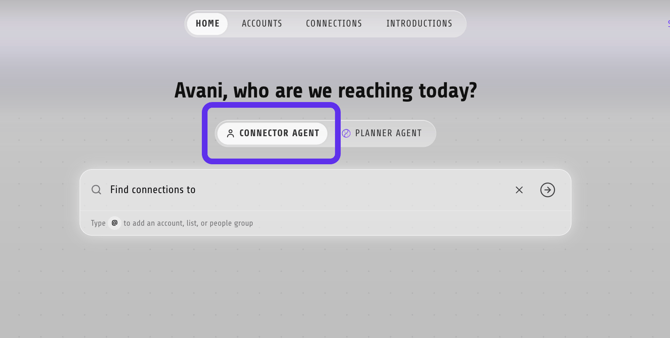
**Step 1:** From the **[Home page](https://vieu.com/home)**, make sure you are using the **Connector Agent**.
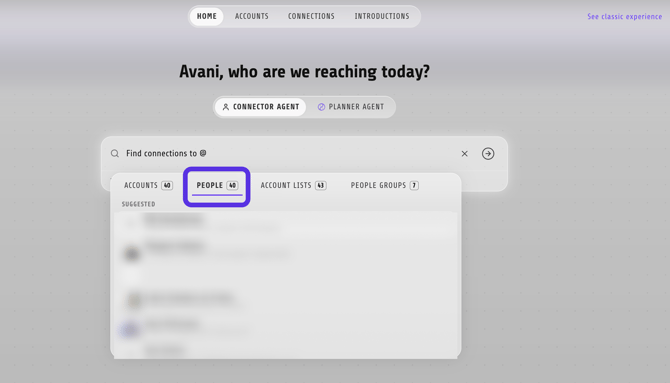
**Step 2.** In the search bar, make sure **People** is selected.
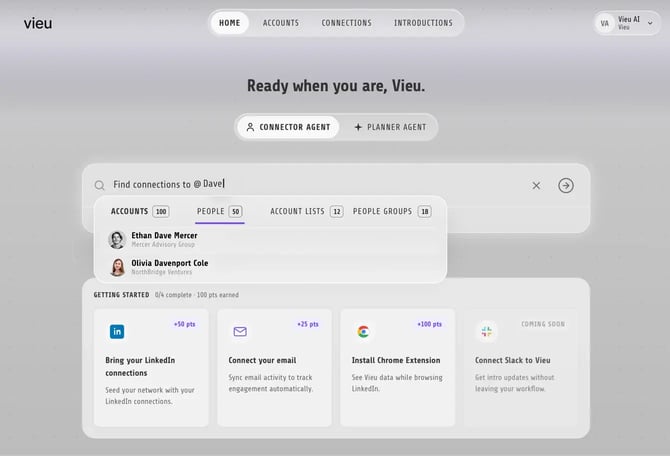
**Step 3:** Enter the person's name. For example, Jane Smith or John Doe. Select the person from the search results.
**Step 4:** Vieu opens Connections Vieu and displays the available connectors to that person. Review the results to understand who can help you reach them before exploring each path in detail.

### 2. Review the available connections - Connections Vieu
The Connections Vieu table gives you a quick view of your target, their company, and the people who can help you reach them, as shown below.
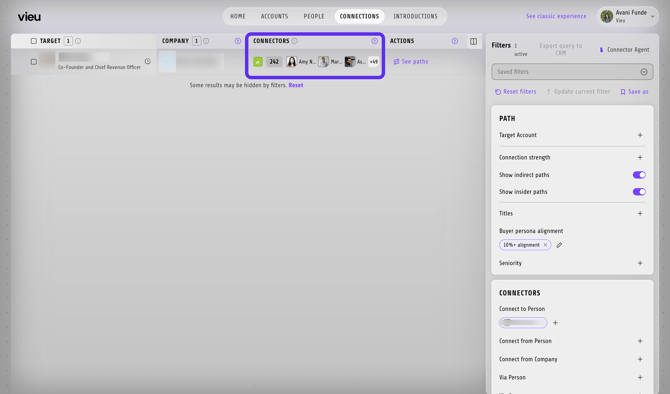
Quickly understand your Connections Vieu
| Column | What it shows |
| --- | --- |
| Target | The person you searched for |
| Company | Their current company |
| Connectors | People who can help you reach the target |
| Actions | Options for viewing the complete paths |
### 3. Take action - See Paths
Click **See paths** under Actionto open the detailed path view.

Each path shows how the connection moves from your network to the target, including the introducer and any intermediaries involved.
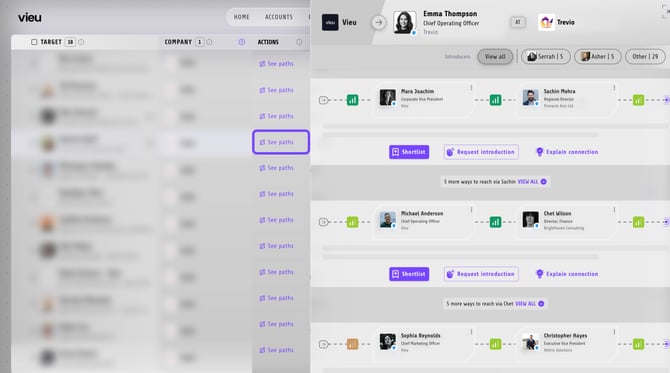
From each path, you can:
- **Shortlist** it for later
- **Request introduction** when you are ready to act
- **Explain connection** to understand the relationship behind the path
### **4. Narrow down the available paths - Filters**
Use the filters on the right pannel to find an introducer who has the right relationship.
As you apply filters, the list updates in real time and the number of available paths reduces accordingly.
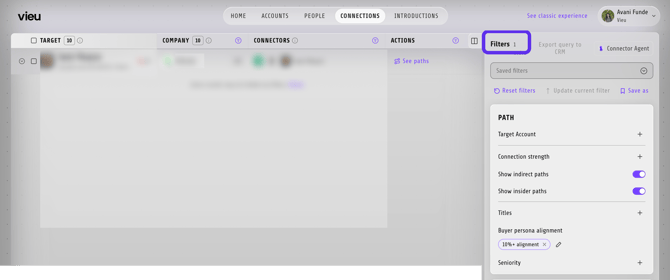
Here's how you can use the filters:
- Prioritize paths by **Connection strength**
- Turn **indirect paths** on or off
- Include or exclude **insider paths**
- Require **verified connectors**
- Limit results to connectors who are current employees
- Filter by **Relationship Type**
- Filter by the introducer’s relationship with the target
- Search for paths from a particular person or company
- Look for routes through a specific person or company
### 5. Customize the table - Edit Columns
Click **Edit columns** in the upper-right corner of the table to choose which information appears in your view.
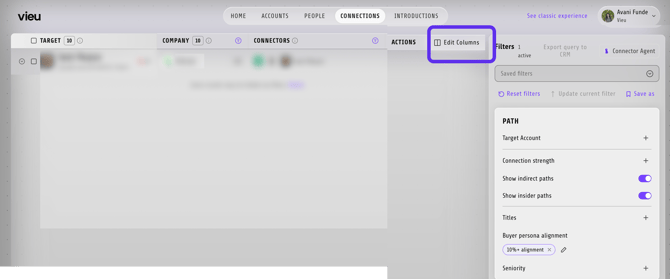
You can add columns such as:
- Alignment
- Vieu Score
- Seniority
### 6. Use Connector Agent to find the best way in
Click **Connector Agent** in the upper-right corner and ask questions about the selected target.
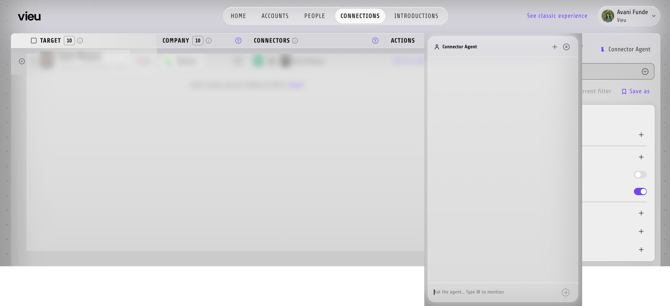
For example:
- What is my strongest path to this person?
- Which connector has the most relevant relationship?
- Show me verified paths to this person.
- Is there an insider who can help me reach them?
Once you find the most credible route, click **See paths** and shortlist it or request an introduction. Vieu's Intro Agent will take care of the next steps and keep the request moving.
Once requested, the introduction is automatically tracked in[**Introductions Vieu**](https://vieu.com/introductions), so it stays visible and easy to follow up on.
#### **Need help?**
If you have questions about cohorts, filters, or choosing the right connection path, reach out to us at **[valet@vieu.com](mailto:valet@vieu.com)**. We’re happy to help.
- [Getting started](https://help.vieu.com/getting-started?hsLang=en)
- [Integrations](https://help.vieu.com/integrations?hsLang=en#main-content)
- [MCP Integration (AI Assistants)](https://help.vieu.com/integrations?hsLang=en#mcp-integration-ai-assistants)
- [CRM Integrations](https://help.vieu.com/integrations?hsLang=en#crm-integrations)
- [Chrome Extension](https://help.vieu.com/integrations?hsLang=en#chrome-extension)
- [Email & Calendar](https://help.vieu.com/integrations?hsLang=en#email-calendar)
- [Vieu Agent for Slack](https://help.vieu.com/integrations?hsLang=en#vieu-agent-for-slack)
- [Finding Connections & Intros](https://help.vieu.com/finding-connections-intros?hsLang=en)
- [Requesting & Tracking Introductions](https://help.vieu.com/requesting-tracking-introductions?hsLang=en)
- [Account Planning and People Outreach](https://help.vieu.com/account-planning-and-people-outreach?hsLang=en)
- [Support](https://help.vieu.com/support?hsLang=en)
[](https://help.vieu.com/?hsLang=en)
Copyright © 2026, Vieu