
The New Vieu Experience helps you find the fastest path into your target accounts without switching between multiple views, tabs, or tools.
-
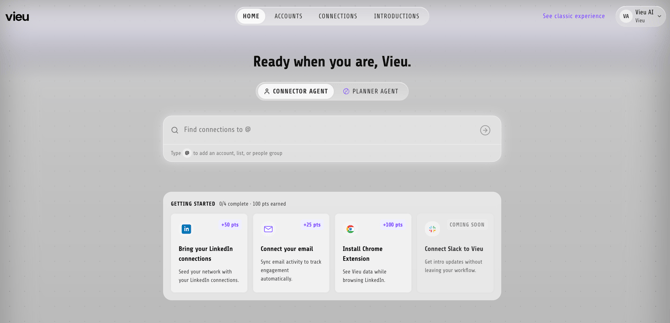
You can simply get started with Vieu Homepage
-
And search across:
-
- Accounts → Find paths into a company
- People → Find paths to a specific person
- Target Account Lists → Explore connections across multiple accounts
- People Groups → Explore connections across multiple people
2. How to search across Accounts, People, Account List or Groups
Prefer a Video Walkthrough instead? Watch this short video
Start typing and select what you want to explore.
Once you search, Vieu will show:
- People who can introduce you
- Relationship context
- The strongest paths available
- Relevant connection insights
Search for an account
Use this when you want to:
- Find who can introduce you into a company
- Understand which relationships already exist
- Identify the strongest path into the account
You can use the existing prompt : "Find connections to @ACME"
or “Who can introduce me to ACME?”
.jpg?width=670&height=457&name=01%2023%20(1).jpg)
Search for a person
Use this when you want to:
- Reach a specific executive or buyer
- Understand who knows them
- Explore relationship context before outreach
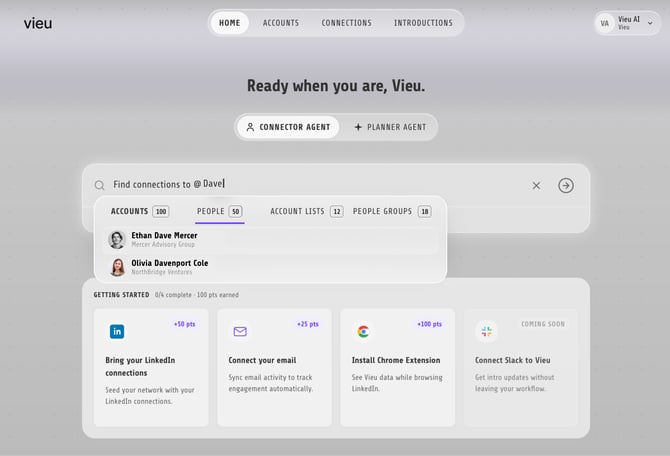
You can use the existing prompt : “Find Connections to Dave?”
or “Who can introduce me to Dave?”
Search across an Account List (Cohort)
Account Lists allow you to explore connections across multiple target accounts at once.
These are the cohorts uploaded into Vieu.
You can use this to:
- Identify which accounts already have warm paths
- Prioritize accounts with the strongest relationship coverage
- Understand where your network is strongest
You can use the existing prompt : “Find connections to @Enterprise Pipeline"
or “Find VP and CXO connections across @My Strategic Accounts List"
.jpg?width=670&height=457&name=03%207%20(1).jpg)
Search across a People Group
People Groups help you explore introduction paths and relationship coverage across a list of target people.
Use this when you want to:
- Find who can introduce you to people in a target list
- Explore connections across a buying committee or stakeholder group
- Understand relationship coverage across a set of target personas
- Identify the strongest paths into a group of people
You can use the existing prompt : “Find connections to @Target Personas JFM"
or “Who can help me reach @Target Personas JFM?"
.jpg?width=670&height=457&name=04%207%20(1).jpg)
Best practices
Start with a simple question.
Examples:
- Account → “Show VP and CXO connections at @Account Name”
- Person → “Who can introduce me to @Person Name?”
- Account List → “Which accounts in @Account List have paths through @People Group?”
- People Group → “Who can help me reach out to @People Group?"
The more specific the search, the easier it becomes to identify actionable paths quickly.
Refer to The Query Guide, to learn more about search experience and example queries,
Your search results will redirected you to Connections Vieu. This is where you explore relationship paths, stakeholder coverage, and introduction opportunities in more detail. It helps you understand:
- who can introduce you
- how strong the relationship is
- which buyers or stakeholders are reachable
- which paths are best suited for outreach
What You’ll Find in Connections Vieu
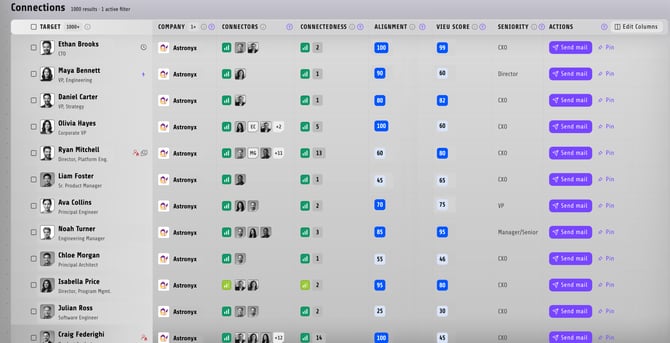
Once redirected, you’ll see a list of stakeholders along with relationship and path information associated with your search.
Prefer a walkthrough instead? Watch this short video
Depending on your selected view and enabled columns, you may see some or all of the following fields.
- Target → Find stakeholders returned in your search
- Company → Find the associated account or company
- Connectors → See who can introduce you
- Connectedness → Understand relationship path strength
- Alignment → View buyer persona alignment
- Vieu Score → Identify strongest relationship opportunities
- Seniority → View stakeholder seniority level
- Actions → Take outreach or pinning actions
Customize Your View
You can customize which columns appear in Connections Vieu by clicking Edit Columns.
.jpg?width=670&height=344&name=01%2022%20(2).jpg)
This allows you to:
- show only relevant fields
- hide unnecessary columns
- simplify account research
- customize the view for your workflow
Your selected columns can be adjusted depending on the type of relationship research you’re performing.
Using Filters
On the right side of the page, you’ll find filters that help refine your search results.
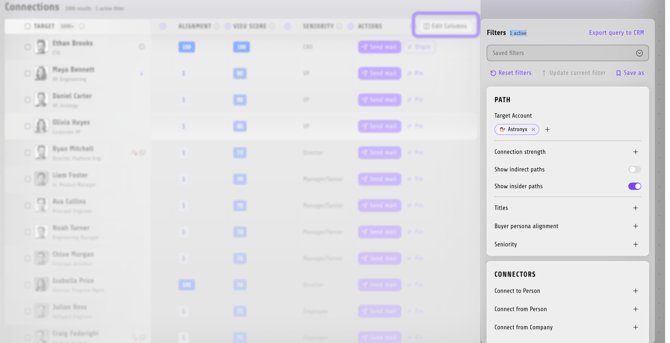
You can use filters to narrow results based on:
- target accounts
- connection strength
- direct or indirect paths
- insider paths
- titles
- buyer persona alignment
- seniority
- connector relationships
This helps you focus on the most relevant stakeholders and relationship paths for your workflow.
Take Action on a Connection
Once you identify a relevant connection, click on the stakeholder name or connector to open the connection details panel.
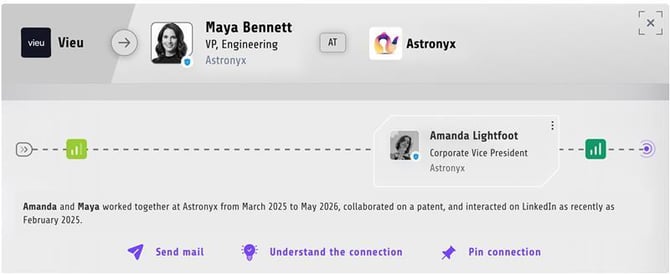
From here, you can:
- Understand the connection → View additional relationship context and understand how the connector knows the stakeholder
- Send mail → Reach out directly to the connector or stakeholder
- Pin connection → Save the connection for later follow-up or review
This helps you move from relationship discovery to outreach and action quickly within Vieu.
Need help?For help setting up filters, customizing views, or improving search workflows, reach out to your CSM or contact Vieu Valet at valet@vieu.com.