---
title: Everything You Need to Know About Intro Agent (Beta)
description: when you're ready to request an introduction and want to understand what happens after you click Send, how requests are routed, and how to track their progress.
---
[Skip to content](https://help.vieu.com/get-to-know-your-intro-agent#main-content)

Open main navigation
Close main navigation
- Contact us
Contact us
How can we help you?
- There are no suggestions because the search field is empty.
1. [Vieu Knowledge Base](https://help.vieu.com/?hsLang=en)
2. [Requesting & Tracking Introductions](https://help.vieu.com/requesting-tracking-introductions?hsLang=en)
# Everything You Need to Know About Intro Agent (Beta)
Once you've found a strong warm path to your target, **Intro Agent** can take over the outreach, follow-up, and routing behind the scenes so your introduction moves forward.
Use this article when you're ready to request an introduction and want to understand what happens after you click **Send**, how requests are routed, and how to track their progress.
**Note:** Intro Agent is currently in **Beta** Stage and may not be available for all organizations. If you'd like to learn more or enable it for your team, contact your Customer Success Manager (CSM) or Vieu Valet.
Before Intro Agent can help, you'll need to shortlist a connection.
1. Open [**Connections Vieu**.](https://www.vieu.com/connections#pmc=JTdCJTIyZ2VuZXJhbCUyMiUzQSU3QiUyMnBpdm90cyUyMiUzQSU1QiU1RCUyQyUyMmV4Y2x1ZGVkUGl2b3RzJTIyJTNBJTVCJTVEJTJDJTIyc2hvd0luZGlyZWN0UGF0aHMlMjIlM0F0cnVlJTJDJTIyc2hvd0luc2lkZXJQYXRocyUyMiUzQXRydWUlMkMlMjJyZXF1aXJlVGFyZ2V0UGVyc29uYSUyMiUzQWZhbHNlJTJDJTIyc2VuaW9yaXR5JTIyJTNBJTVCMSUyQzEwMCU1RCUyQyUyMmV4Y2x1ZGUlMjIlM0ElNUIlNUQlMkMlMjJpbmNsdWRlJTIyJTNBJTVCJTVEJTJDJTIyc2VhcmNoUXVlcnklMjIlM0ElMjIlMjIlMkMlMjJ0YWdzJTIyJTNBJTVCJTVEJTJDJTIyZXhjbHVkZVRhZ3MlMjIlM0ElNUIlNUQlMkMlMjJyZXF1aXJlQ3VycmVudEVtcGxveWVlJTIyJTNBdHJ1ZSUyQyUyMnRpdGxlcyUyMiUzQSU1QiU1RCUyQyUyMmV4Y2x1ZGVkVGl0bGVzJTIyJTNBJTVCJTVEJTJDJTIyY29ubmVjdGlvblNvdXJjZSUyMiUzQSUyMiUyMiUyQyUyMmNvbm5lY3Rpb25UYXJnZXQlMjIlM0ElMjIlMjIlMkMlMjJjb25uZWN0aW9uU291cmNlcyUyMiUzQSU1QiU1RCUyQyUyMmNvbm5lY3Rpb25UYXJnZXRzJTIyJTNBJTVCJTVEJTJDJTIyYnV5ZXJTY29yZSUyMiUzQTEwJTJDJTIyY29ubmVjdGlvblN0cmVuZ3RoJTIyJTNBMCUyQyUyMmlnbm9yZVNub296ZSUyMiUzQWZhbHNlJTJDJTIyY29tcGFueUlkcyUyMiUzQSU1QiUyMkNPTVAtMDM1YjAzMjQtNDdkZC00MWNhLTlhN2MtNzM5NGExNjk2YmI0JTIyJTVEJTJDJTIyZXhjbHVkZWRUYXJnZXRDb21wYW5pZXMlMjIlM0ElNUIlNUQlMkMlMjJjb25uZWN0VG9JbmNsdWRlUGVyc29uJTIyJTNBJTVCJTVEJTJDJTIyY29ubmVjdFRvRXhjbHVkZVBlcnNvbiUyMiUzQSU1QiU1RCUyQyUyMmNvbm5lY3RUb0luY2x1ZGVQZXJzb25Db2hvcnQlMjIlM0ElNUIlNUQlMkMlMjJjb25uZWN0VG9FeGNsdWRlUGVyc29uQ29ob3J0JTIyJTNBJTVCJTVEJTJDJTIyY29ubmVjdEZyb21JbmNsdWRlUGVyc29uJTIyJTNBJTVCJTVEJTJDJTIyY29ubmVjdEZyb21FeGNsdWRlUGVyc29uJTIyJTNBJTVCJTVEJTJDJTIyY29ubmVjdEZyb21JbmNsdWRlUGVyc29uQ29ob3J0JTIyJTNBJTVCJTVEJTJDJTIyY29ubmVjdEZyb21FeGNsdWRlUGVyc29uQ29ob3J0JTIyJTNBJTVCJTVEJTJDJTIyY29ubmVjdEZyb21JbmNsdWRlQ29tcGFueSUyMiUzQSU1QiU1RCUyQyUyMmNvbm5lY3RGcm9tRXhjbHVkZUNvbXBhbnklMjIlM0ElNUIlNUQlMkMlMjJjb25uZWN0RnJvbUluY2x1ZGVDb21wYW55Q29ob3J0JTIyJTNBJTVCJTVEJTJDJTIyY29ubmVjdEZyb21FeGNsdWRlQ29tcGFueUNvaG9ydCUyMiUzQSU1QiU1RCUyQyUyMnZpYUluY2x1ZGVQZXJzb24lMjIlM0ElNUIlNUQlMkMlMjJ2aWFFeGNsdWRlUGVyc29uJTIyJTNBJTVCJTVEJTJDJTIydmlhSW5jbHVkZVBlcnNvbkNvaG9ydCUyMiUzQSU1QiU1RCUyQyUyMnZpYUV4Y2x1ZGVQZXJzb25Db2hvcnQlMjIlM0ElNUIlNUQlMkMlMjJ2aWFJbmNsdWRlQ29tcGFueSUyMiUzQSU1QiU1RCUyQyUyMnZpYUV4Y2x1ZGVDb21wYW55JTIyJTNBJTVCJTVEJTJDJTIydmlhSW5jbHVkZUNvbXBhbnlDb2hvcnQlMjIlM0ElNUIlNUQlMkMlMjJ2aWFFeGNsdWRlQ29tcGFueUNvaG9ydCUyMiUzQSU1QiU1RCU3RCUyQyUyMndvcmtIaXN0b3J5JTIyJTNBJTdCJTIybW9udGhzT3ZlcmxhcER1cmF0aW9uJTIyJTNBMCUyQyUyMmNvbXBhbnlTaXplT3ZlcmxhcCUyMiUzQTAlMkMlMjJyZWNlbmN5JTIyJTNBMCU3RCUyQyUyMnNvY2lhbEludGVyYWN0aW9ucyUyMiUzQSU3QiUyMm11dHVhbEludGVyYWN0aW9uQ291bnQlMjIlM0EwJTJDJTIyaW5jbHVkZUxpbmtlZGluQ29ubmVjdGlvbnMlMjIlM0F0cnVlJTdEJTJDJTIyc2hhcmVkR3JvdXBzJTIyJTNBJTdCJTIyZ3JvdXBTaXplJTIyJTNBMCUyQyUyMnJlY2VuY3klMjIlM0EwJTdEJTJDJTIyYWNjb3VudCUyMiUzQSU3QiUyMmluZHVzdHJ5JTIyJTNBJTVCJTVEJTJDJTIybG9jYXRpb24lMjIlM0ElNUIlNUQlMkMlMjJlbXBsb3llZUNvdW50JTIyJTNBJTVCJTVEJTJDJTIyaGlkZUN1c3RvbWVycyUyMiUzQWZhbHNlJTdEJTJDJTIycGF0aCUyMiUzQSU3QiUyMnJlcXVpcmVWZXJpZmllZCUyMiUzQWZhbHNlJTJDJTIycmVxdWlyZUNvbm5lY3Rpb25UeXBlcyUyMiUzQSU1QiU1RCUyQyUyMmV4Y2x1ZGVDb25uZWN0aW9uVHlwZXMlMjIlM0ElNUIlNUQlMkMlMjJ0eXBlcyUyMiUzQSU1QiUyMnBlcnNvbiUyMiU1RCU3RCU3RA%3D%3D)
2. Find the person or account you want to reach.
3. Review the available connection paths.
4. Click **Request Introduction** on the connector you'd like to use.
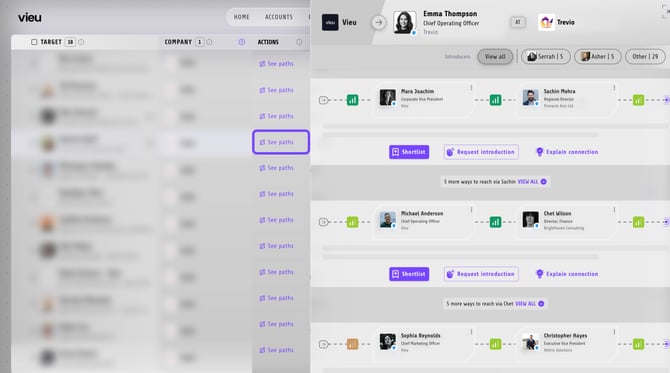
**The Intro Agent Workflows are triggered after this.**
Every request the Intro Agent handles gets routed down one of three paths.
1. Path A — Introducer Workflow
2. Path B — Guardian Workflow
3\. Path C — GTM Play
Your organization's introduction workflow is configured by your administrator. If you'd like to enable or change how introduction requests are routed, please contact your Customer Success Manager (CSM).
### Path A — Introducer Workflow
The request is sent directly to the introducer, who receives it in their introduction digest and can respond with one of three actions.
**How it works:**
1\. Your introducer receives all of your requested introductions in their **weekly digest**.
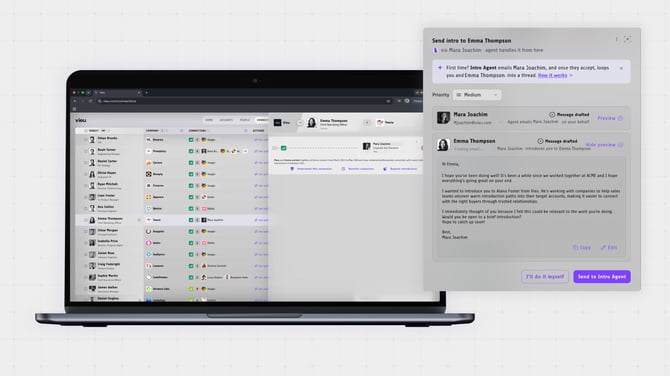
2\. Each request in the digest gives them three buttons:
- - **Make Introduction** — opens a ready-to-send email right away.
- **Happy to Help** — keeps the request on their radar to send later.
- **Not Sure I Can Help** — lets you know they can't make the connection.
3\. As soon as they pick "Make Introduction" or "Happy to Help," an email drafts itself with you auto-CC'd — so you'll see it land in your inbox without having to check in.
**If the introducer clicks Make Introduction**
A ready-to-send introduction email opens with the recipient, subject, and message already filled in. The introducer can review the email, make any final edits if needed, and send the introduction immediately.
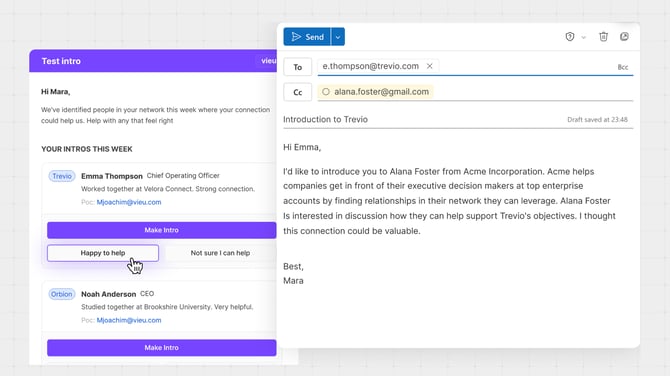
**If the introducer clicks *Happy to Help***
A pre-filled introduction email is saved as a draft in the introducer's inbox. They can return to it later, review or edit the message, and send the introduction when they're ready.
**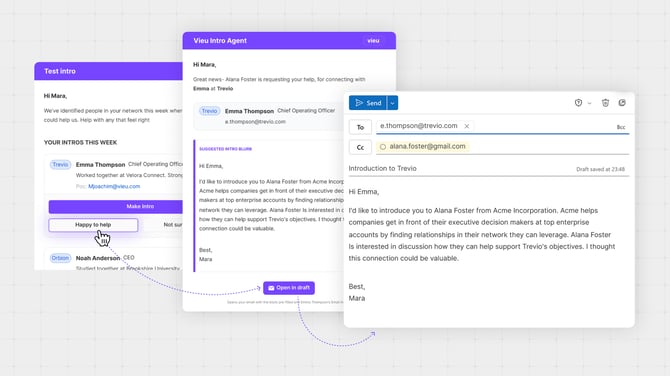**
**Look at the [Introductions Vieu](https://www.vieu.com/introductions) to understand the status of the Intro**
### Path B — Guardian Workflow
If your organization uses a **GTN Commander**, all introduction requests are routed to them first for review. Once approved, the request is automatically forwarded to the introduce.
**How it works:**
1\. A designated **Guardian** (usually a manager or a lead) sees your request first, with a simple yes/no gut-check.
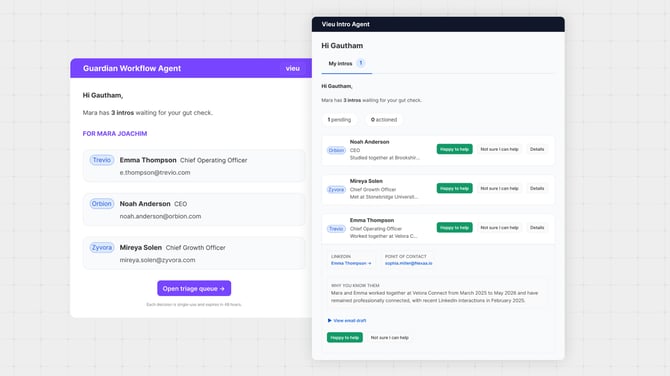
2\. If they approve, the request moves into the standard Introducer Workflow (Path A) above — where the introducer can choose to make the introduction, save it for later, or decline it.
### Path C — GTM Play
This workflow is used to help stakeholders review and action multiple introduction requests **ahead of important events or as part of recurring business workflows**. Examples include board meetings, investor updates, executive reviews, and other strategic planning sessions.
**How it works:**
1. The stakeholder gets a **magic link** surfacing all pending intros relevant to that meeting.
2. They can review the requests and share the link with anyone else who needs visibility.
3. They approve or deny directly from the link — no login to Vieu required.
### Need help?
Intro Agent workflows are configured at the organization level. If you'd like to enable, customize, or update your workflow, **please contact your Customer Success Manager (CSM) or write to us at [valet@vieu.com.](mailto:valet@vieu.com)**
- [Getting started](https://help.vieu.com/getting-started?hsLang=en)
- [Integrations](https://help.vieu.com/integrations?hsLang=en#main-content)
- [MCP Integration (AI Assistants)](https://help.vieu.com/integrations?hsLang=en#mcp-integration-ai-assistants)
- [CRM Integrations](https://help.vieu.com/integrations?hsLang=en#crm-integrations)
- [Chrome Extension](https://help.vieu.com/integrations?hsLang=en#chrome-extension)
- [Email & Calendar](https://help.vieu.com/integrations?hsLang=en#email-calendar)
- [Vieu Agent for Slack](https://help.vieu.com/integrations?hsLang=en#vieu-agent-for-slack)
- [Finding Connections & Intros](https://help.vieu.com/finding-connections-intros?hsLang=en)
- [Requesting & Tracking Introductions](https://help.vieu.com/requesting-tracking-introductions?hsLang=en)
- [Account Planning and People Outreach](https://help.vieu.com/account-planning-and-people-outreach?hsLang=en)
- [Support](https://help.vieu.com/support?hsLang=en)
[](https://help.vieu.com/?hsLang=en)
Copyright © 2026, Vieu