
Vieu works wherever you do. Use Vieu with AI tools like Claude, ChatGPT, and Perplexity to find warm introductions, understand relationship paths, research accounts, and identify the right stakeholders without leaving the conversation.
How It Works
Vieu connects to Claude, ChatGPT, and Perplexity through MCP (Model Context Protocol), a standard that allows AI assistants to securely access external tools and data.
Once connected, your AI assistant can query Vieu on your behalf and return relationship intelligence directly in the conversation. Simply ask a question in plain English and Vieu will determine when relationship data is needed and return the most relevant information.
Before you start, make sure you have:- Access to Claude, ChatGPT, or Perplexity with MCP support enabled.
- A Vieu account.
- Permission to authenticate with your Vieu account.
Get Started
Choose your AI assistant and follow the setup guide:
Here's a quick video guide for you. You can watch it first or follow the instructions below at your own pace. How to Connect Vieu MCP to Claude
Please Note: Vieu MCP is currently in Beta and continues to improve with every release.
Today, Vieu MCP can help you:
- Find warm paths into target accounts.
- Discover introductions to specific people.
- Understand how relationship paths are connected.
- Research accounts and stakeholders directly from your AI assistant.
- Ask questions in natural language without learning special commands or syntax.
If a query doesn't return exactly what you expect, try adding more context such as the company name, title, or function.
We're actively improving search quality, relationship ranking, path explanations, and support for more complex searches based on user feedback.
To connect Vieu MCP to Claude, follow these steps
Step 1: Open Connectors in Claude
-
- Open Claude.
- Click your profile icon in the bottom-left corner.
- Select Settings.
- Click Connectors.
You can also access the connectors page directly.
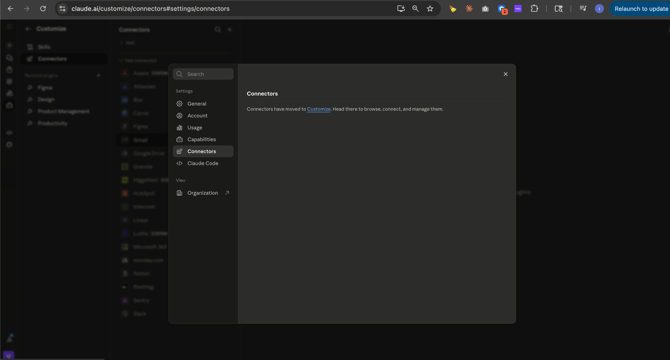
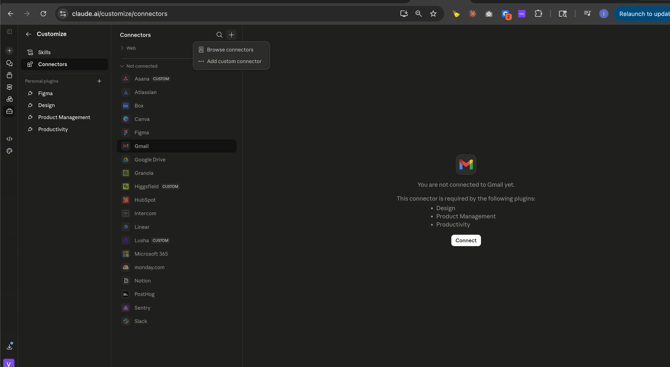
Step 2: Add the Vieu MCP Connector
-
- Click the + icon.
- Select Add custom connector.
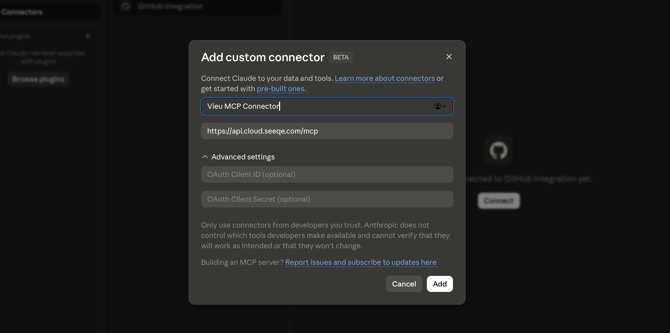
3. Enter a name for the connector - Vieu
4. Enter the Remote MCP Server URL - https://api.cloud.seeqe.com/mcp
5. Leave Advanced Settings unchanged.
6. Click Add.
The connector will now appear in your list of available connectors.
Step 3: Connect Your Vieu Account
1. Click Connect next to the Vieu MCP connector.
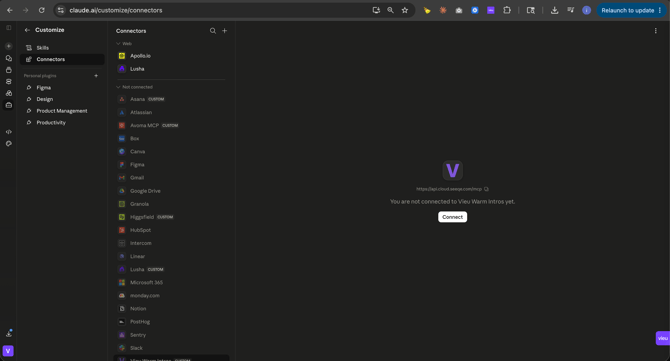
2. Complete the OAuth authentication flow (you will be asked to sign in to your Vieu Account, use the correct Vieu account during authentication.)
3. Review and approve the requested permissions.
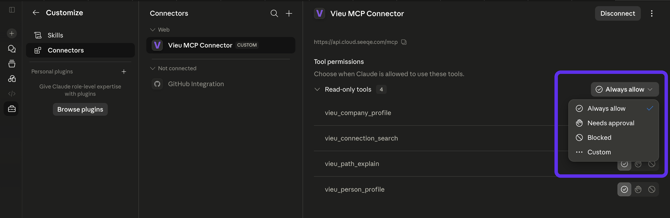
Once authentication is complete, Claude can securely access Vieu MCP tools on your behalf.
Step 4: Verify the Connection
After connecting, the Vieu MCP connector should display as connected. You should also see the Vieu tools available to Claude.
Depending on your configuration, available capabilities will include:
- Finding warm introductions
- Explaining relationship paths
- Researching people
- Researching accounts
- Creating account plans
Step 5: Test the Connection
Run a simple query to confirm the connector is working correctly.
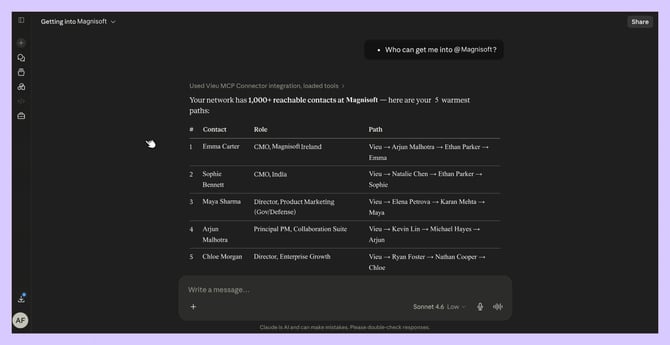
Find Warm Connections : Try
- Who can get me into @Stripe?
- Do I have relationships to a VP of Sales at @Stripe?
Claude should return ranked introduction paths and relationship recommendations.
Understand a Relationship Path : Try
- Tell me more about the path to @Dana Whitfield.
- Explain the strongest path into @Stripe.
Claude should explain how the relationship was formed and why the introduction path is credible.
Research an Account : Try
- What does @Stripe do?
- Create an account plan for @Microsoft.
Claude should return account information and planning recommendations.
If Claude returns Vieu relationship intelligence successfully, the connector is working correctly.
Need help?
If you run into issues during setup or want help with field mapping, reach out to us at valet@vieu.com.