---
title: Partner Organizations : Add and Manage Organizations in Your Network
description: Learn how to add and manage partner organizations in Partner Network to expand your relationship graph and discover more warm introduction paths.
---
[Skip to content](https://help.vieu.com/partner-organizations-add-and-manage-organization-#main-content)

Open main navigation
Close main navigation
- Contact us
Contact us
How can we help you?
- There are no suggestions because the search field is empty.
1. [Vieu Knowledge Base](https://help.vieu.com/?hsLang=en)
2. [Getting started](https://help.vieu.com/getting-started?hsLang=en)
# Partner Organizations : Add and Manage Organizations in Your Network
Partner Network helps you extend your organization's relationship graph by adding strategic partners to Vieu. By including partner organizations, Vieu can uncover additional warm introduction paths that wouldn't exist within your own network.
From here, you can
- Add partner organizations
- View existing partners
- See partner connection coverage
- Remove outdated partners
#### **Access Partner Network**
Partner Network is typically configured during onboarding, but administrators can update it at any time as new partnerships are established.
1\. Click your **profile icon** in the top-right corner of Vieu.
2\. Select **GTM Neural Center**.
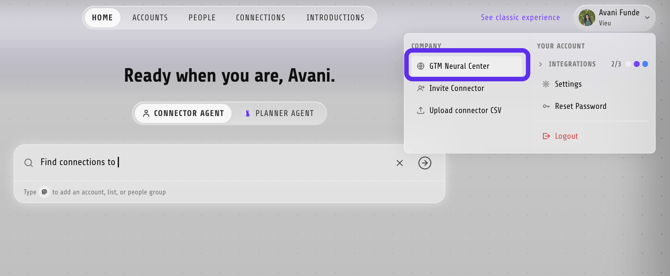
3\. From the left sidebar, click **Partner Network**.
### Understand the Partner Network page
The Partner Network page lists every partner organization connected to your workspace.
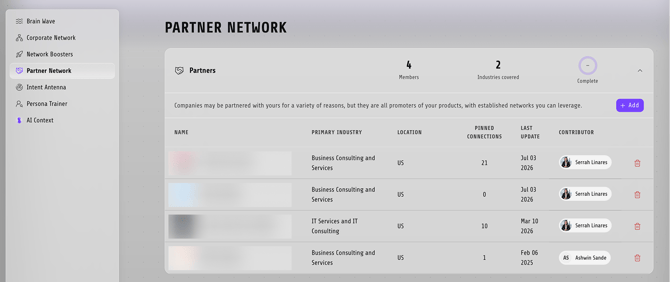
For each partner, you can see:
- **Name** – The partner organization.
- **Primary Industry** – The partner's industry.
- **Location** – Where the partner is based.
- **Pinned Connections** – The number of verified relationship paths available through that partner.
- **Last Update** – When the partner record was last updated.
- **Contributor** – The user who added the partner.
### Add a partner organization
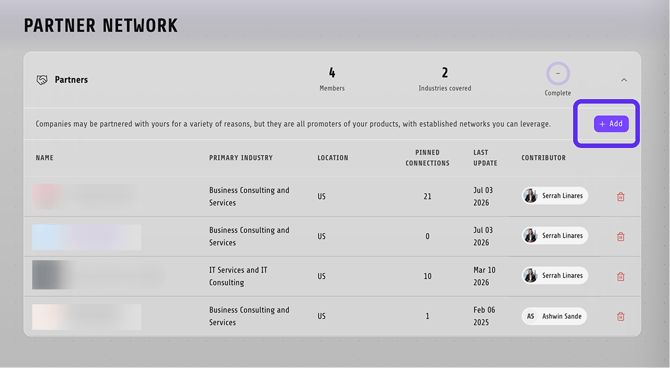
1\. Click **+ Add**.
2\. Search for a company by: Company name, Stock ticker and LinkedIn Company URL
3\. Choose **View All** to search all available companies or **Verified** to show verified organizations only.
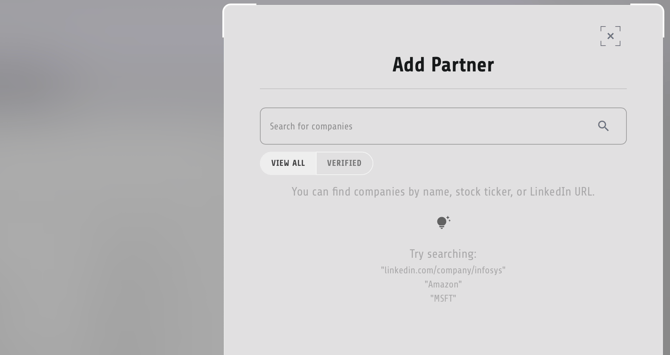
4\. Select the partner organization to add it to your Partner Network.
Once added, any available partner relationships become part of your organization's shared relationship graph.
**Best practice**
Keep your Partner Network aligned with your active strategic partnerships. Adding new partners and removing outdated ones ensures Vieu can surface the strongest and most relevant warm introduction paths for your team.
**Need help?**
If you run into issues during setup or want help with field mapping, reach out to us at **[valet@vieu.com.](mailto:valet@vieu.com)**
- [Getting started](https://help.vieu.com/getting-started?hsLang=en)
- [Integrations](https://help.vieu.com/integrations?hsLang=en#main-content)
- [MCP Integration (AI Assistants)](https://help.vieu.com/integrations?hsLang=en#mcp-integration-ai-assistants)
- [CRM Integrations](https://help.vieu.com/integrations?hsLang=en#crm-integrations)
- [Chrome Extension](https://help.vieu.com/integrations?hsLang=en#chrome-extension)
- [Email & Calendar](https://help.vieu.com/integrations?hsLang=en#email-calendar)
- [Vieu Agent for Slack](https://help.vieu.com/integrations?hsLang=en#vieu-agent-for-slack)
- [Finding Connections & Intros](https://help.vieu.com/finding-connections-intros?hsLang=en)
- [Requesting & Tracking Introductions](https://help.vieu.com/requesting-tracking-introductions?hsLang=en)
- [Account Planning and People Outreach](https://help.vieu.com/account-planning-and-people-outreach?hsLang=en)
- [Support](https://help.vieu.com/support?hsLang=en)
[](https://help.vieu.com/?hsLang=en)
Copyright © 2026, Vieu