---
title: Set Org-wide Default Filters for Finding Connections
description: Set default connection filters in Vieu to standardize connection discovery across your organization and prioritize high-quality introduction paths.
---
[Skip to content](https://help.vieu.com/set-default-connection-filters#main-content)

Open main navigation
Close main navigation
- Contact us
Contact us
How can we help you?
- There are no suggestions because the search field is empty.
1. [Vieu Knowledge Base](https://help.vieu.com/?hsLang=en)
2. [Getting started](https://help.vieu.com/getting-started?hsLang=en)
# Set Org-wide Default Filters for Finding Connections
Default Connection Filters help your team focus on the most relevant introduction paths by setting predefined criteria. Instead of manually applying filters every time, you can configure default values once, so everyone sees consistent, high-quality recommendations from the start.
Setting default filters will ensure:
- Your team focuses on relevant, high-quality connections from the start
- Connection discovery is consistent across the organization
- Less time is spent manually adjusting filters
### Set up default connection filters
#### **Step 1: Log in to Vieu**
[Log in to Vieu](https://www.vieu.com/home)
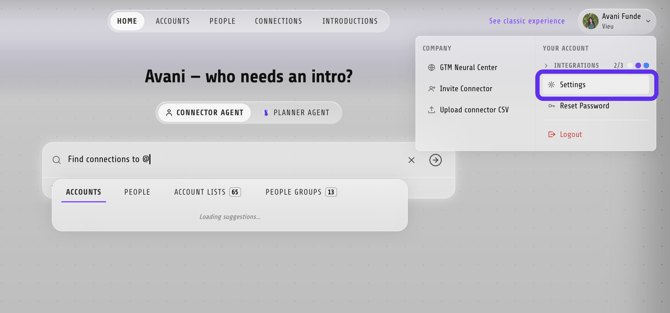
#### **Step 2: Go to Settings**
Click your account name in the top right, then select **Settings**.
****
#### **Step 3: Open Connections**
On the left panel under **Tenant**, click **Connections**.
**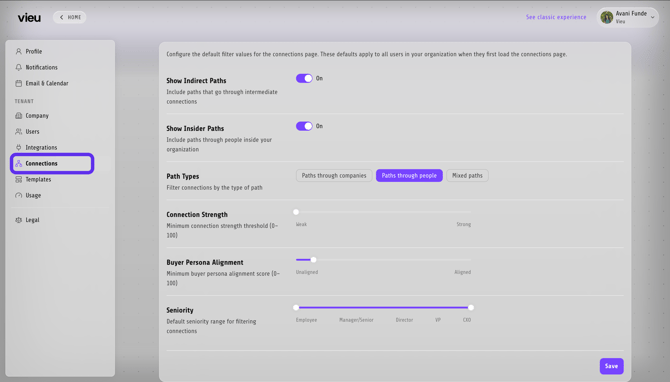**
#### **Step 4: Configure default filters**
Choose the default values that should apply across **Connections Vieu, here's how :**
#### Filter fields
| Filter | Description |
| --- | --- |
| **Show Indirect Paths** | Includes paths where the introducer isn't directly connected to the target but can still facilitate an introduction. |
| **Show Insider Paths** | Includes paths through people closely associated with the account (e.g., employees, ex-employees, investors). |
| **Path Types** | Choose which type of path is shown by default: **Paths through companies**, **Paths through people**, or **Mixed paths**. |
| **Connection Strength** | Sets the minimum relationship strength (0–100) between the introducer and the target, from Weak to Strong. |
| **Buyer Persona Alignment** | Sets the minimum alignment score (0–100) with your defined buyer persona, from Unaligned to Aligned. |
| **Seniority** | Sets the default seniority range for targets — Employee, Manager/Senior, Director, VP, or CXO. |
#### **Step 5: Save your changes**
Once you've set your desired defaults, click **Save** in the bottom right corner to apply them.
#### What happens after setup
- Default filters are applied across the organization in **Connections Vieu**
- All users start with the same filtered view
- Users can still adjust filters for specific use cases
**Need help?**
If you run into issues during setup or want help with field mapping, reach out to us at **[valet@vieu.com.](mailto:valet@vieu.com)**
- [Getting started](https://help.vieu.com/getting-started?hsLang=en)
- [Integrations](https://help.vieu.com/integrations?hsLang=en#main-content)
- [MCP Integration (AI Assistants)](https://help.vieu.com/integrations?hsLang=en#mcp-integration-ai-assistants)
- [CRM Integrations](https://help.vieu.com/integrations?hsLang=en#crm-integrations)
- [Chrome Extension](https://help.vieu.com/integrations?hsLang=en#chrome-extension)
- [Email & Calendar](https://help.vieu.com/integrations?hsLang=en#email-calendar)
- [Vieu Agent for Slack](https://help.vieu.com/integrations?hsLang=en#vieu-agent-for-slack)
- [Finding Connections & Intros](https://help.vieu.com/finding-connections-intros?hsLang=en)
- [Requesting & Tracking Introductions](https://help.vieu.com/requesting-tracking-introductions?hsLang=en)
- [Account Planning and People Outreach](https://help.vieu.com/account-planning-and-people-outreach?hsLang=en)
- [Support](https://help.vieu.com/support?hsLang=en)
[](https://help.vieu.com/?hsLang=en)
Copyright © 2026, Vieu