
The Vieu Chrome Extension brings Vieu's relationship intelligence directly into the tools you already use, including LinkedIn, company websites, and your CRM (Salesforce or HubSpot). Instead of switching back to Vieu while you research, you can see warm introduction paths wherever you're working.
This article focuses on using the extension on LinkedIn. Once you've installed the Vieu Browser Extension, you can discover warm introduction paths to any person or company directly from LinkedIn.
With the extension active, you can:
- See everyone in your network who can introduce you to a person or account
- Understand how you're connected
- Message an introducer directly on LinkedIn
- Filter connections to find the strongest path in
- Pin connections to revisit later in Vieu
Finding Connections on a Person's Profile
You're looking at someone's profile and want to know if you have a warm path in.
1. Open and LinkedIn and go to the LinkedIn profile of the person you want to reach.
2. Check the Vieu Logo with a number in the corner of your screen. The number on it tells you how many warm paths exist to this person.
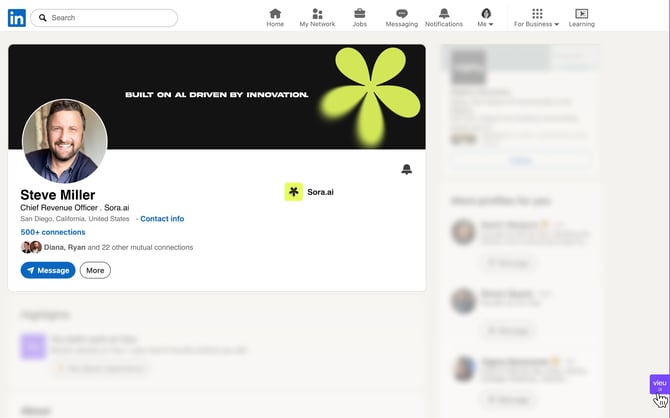
3. Click the Vieu Logo to open the panel.
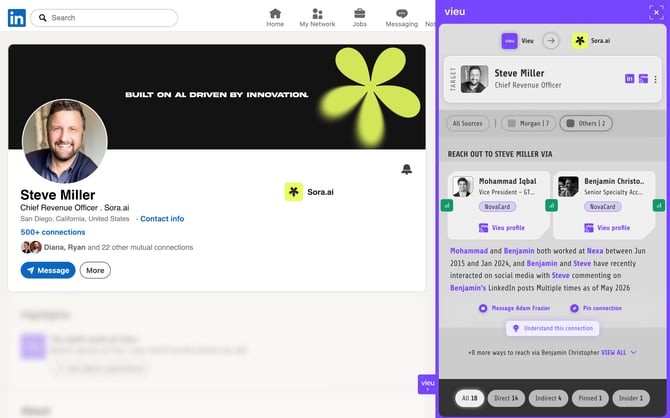
From the panel you can:
- Message the introducer to reach out on LinkedIn and request the introduction
- Click on Understand this connection to see more detail on how your introducer and the target know each other
- Click on Pin Connection to save this path to Vieu and act on it later
3. If you have more than one warm path, click View All at the bottom of the panel to see every option. Use the Direct, Indirect, Pinned, and Insider tabs to filter by connection type.
Continue your outreach: If a warm introduction isn't available, you can still reach out directly by accessing the target's email address or opening their full Vieu profile for additional contact details and context.
Finding Connections on a Company Page
You're researching an account and want to see who in your network knows someone there.
1. Go to the company's LinkedIn page.
2. Click the Vieu Extension button to open the panel.
3. You'll see a connection count badge and a list of targets within that account.
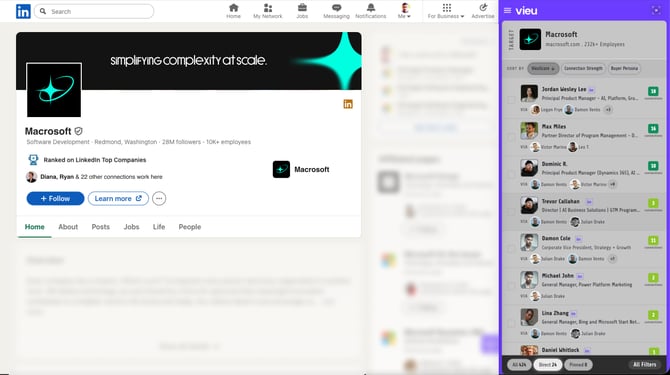
From here you can:
- Browse the list of targets and their connection details
- Pin a connection to your saved list
- Click through to the full account view in Vieu for more detail
Finding Connections in LinkedIn Search Results
The Vieu Chrome extension can help you find people in the serach results where a warm path exists, so you can quickly spot your most reachable prospects.
1. Run a search in LinkedIn.
2. Click the Vieu Extension button to open the panel.
3. The extension highlights people in the results where a warm introduction path exists.
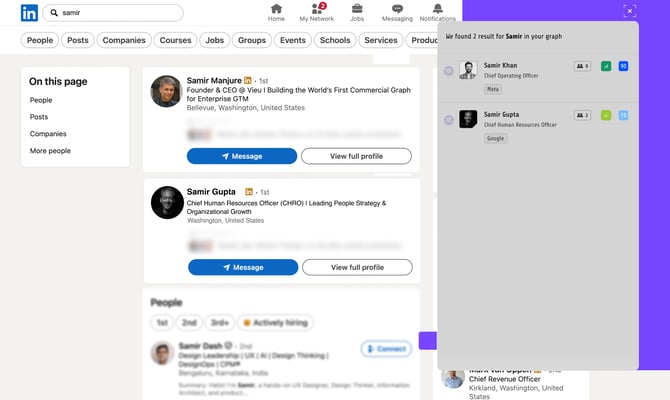
This lets you prioritize reachable prospects without clicking into each profile individually.
Next Steps
Vieu helps you move from prospecting to introductions, without switching tools.
- Log into Vieu and find your pinned connections
- Track introduction progress
- Follow up with the right context
Need help?
Have questions or need help getting started? Reach out to us at valet@vieu.com