
The Vieu Chrome Extension brings Vieu's relationship intelligence directly into the tools you already use, including LinkedIn, company websites, and your CRM (Salesforce or HubSpot).
Wherever you're researching a prospect or account, the extension shows you who in your network can get you in without switching tabs or opening the Vieu app.
This article gives you a quick summary of what the extension does on each platform, with links to step-by-step guides for each.
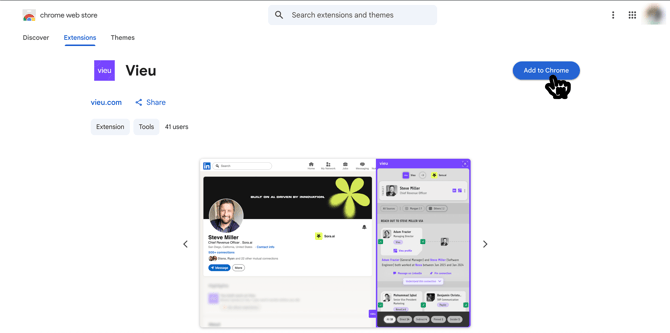
Note: You'll need to install the extension before using it anywhere. Head to how to download and use the Vieu Chrome Extension or Vieu Chrome Extension Installation link, to get set up in under a minute.
On LinkedIn, the extension works on personal profiles, company pages, and search results. You can:
- See everyone in your network who can introduce you to a person or account
- Understand how you're connected (mutual contacts, shared history, etc.)
- Message an introducer directly on LinkedIn
- Pin connections to revisit later in Vieu
.png?width=670&height=419&name=Vieu%20Product%20Screenshot%201%20%20(1).png)
This works for any person or company, including accounts that aren't yet part of one of your target lists.
Check out Use the Vieu Chrome Extension on LinkedIn for step-by-step instructions.
Company Websites
The extension also works on any company website. If you're researching a company directly on their site, the extension automatically recognizes the company and surfaces the same connection-finding tools.

A connection count badge appears as soon as you land on the site, so you'll know at a glance whether a path in exists or not.
Check out Use the Vieu Chrome Extension on Company Websites for step-by-step instructions.
CRM (Salesforce & HubSpot)
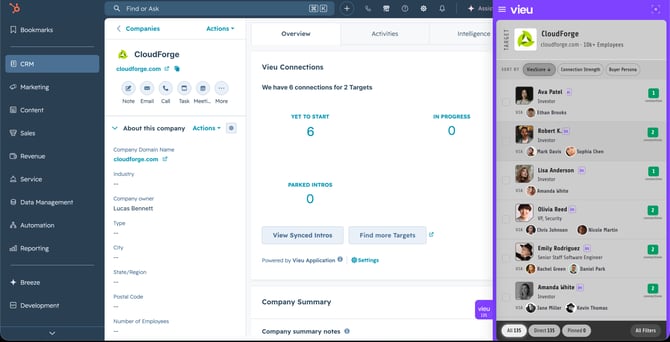
Use the Vieu Chrome Extension directly inside Salesforce or HubSpot to view relationship intelligence without leaving your CRM.
Note: CRM integration is required for this feature to work. The extension relies on your CRM's account and contact IDs to match data with Vieu. If you've installed the extension but don't see results in your CRM, ask your admin to complete the CRM integration first
1. On an Account record
Open any account, then click the Vieu extension. You'll see:
- Reachable contacts at that company
- Warm introduction paths to each contact
- Options to understand the relationship, message your introducer, or pin the connection for later
2. On a Contact record
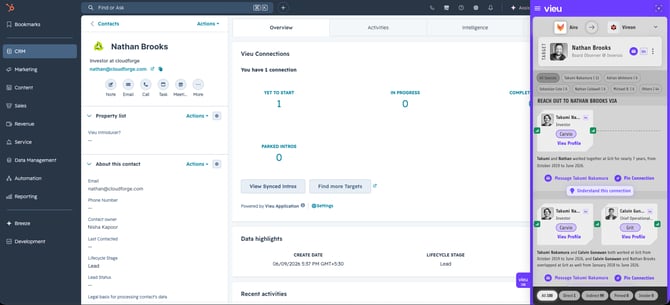
Open any contact, then click the Vieu extension. You'll see:
-
- Your strongest warm introduction path to that person
- Who can introduce you
- Options to understand the relationship, message your introducer, or pin the connection for later
Check out Use the Vieu Chrome Extension with Your CRM for step-by-step instructions.
Next steps
Vieu helps you move from prospecting to introductions, without switching tools.
- Review pinned connections in Vieu
- Track introduction progress
- Follow up with the right context
Need help?
Have questions or need help getting started? Reach out to us at valet@vieu.com