
What Is Vieu Verified?
Vieu Verified ensures that the person shown in a connection path is the correct professional at the correct company, not just a name match.
In enterprise sales, identity accuracy matters. Acting on the wrong profile can delay introductions, create confusion, or reduce credibility with senior stakeholders. Vieu Verified adds a built-in trust layer to your relationship graph so you can act with confidence.
When a connection is marked as Verified, it means Vieu has validated that individual’s identity using multiple professional and relationship signals.
Only profiles that pass these checks are labeled Verified.
This prevents:
-
Duplicate profiles
-
Common-name confusion
-
Incorrect executive mapping
-
Unreliable introduction paths
For you, this means one thing: when you request an introduction, you know you’re targeting the right executive at the right company through a trusted path.
Verification runs automatically in the background. You don’t need to configure anything.
How “Show Only Verified” Works in Connections Vieu
In Connections Vieu, the “Show only verified” filter is turned on by default.
When you search:
-
To a Person
-
To an Account
Vieu automatically prioritizes identity-validated executives.
You can turn this filter off if you want to explore all possible paths, including unverified profiles.
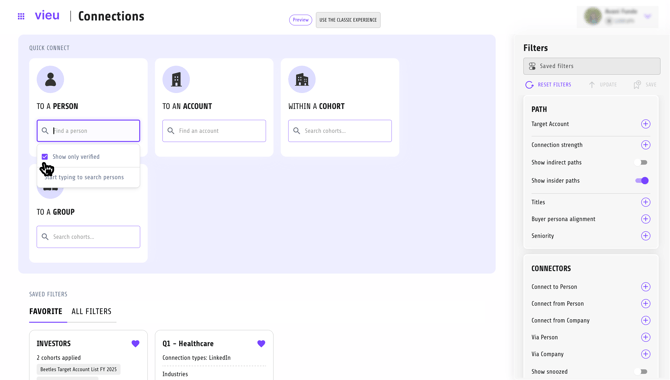
When should you turn it off?
Turn it off when you’re:
-
Exploring broadly during early discovery
-
Reviewing every possible connection before narrowing down
For action-oriented workflows (especially before requesting an introduction) keeping Verified on is recommended.
Best Practice
Before you pin a path or send an intro request, keep Show only verified enabled. It reduces hesitation, improves connector confidence, and ensures cleaner executive engagement.