
Why sync your CRM with Vieu?
Your CRM is where your GTM motion lives, with accounts, ownership, opportunities, and accountability. But CRMs weren’t built to understand relationships.
Vieu connects relationship intelligence to CRM context so connections aren’t just interesting, they’re actionable.
What becomes possible when your CRM is connected
Once your CRM is connected, Vieu starts working inside real workflows, not alongside them.
You can:
- See relationship context directly tied to accounts and contacts
- Move the right connections into CRM exactly when they matter
- Keep relationship and introduction status aligned across systems
- Work with connection data inside Salesforce or HubSpot
- Report on warm paths and introductions alongside pipeline
- Control access, permissions, and data hygiene without extra overhead
This is where teams stop finding relationships and start using them.
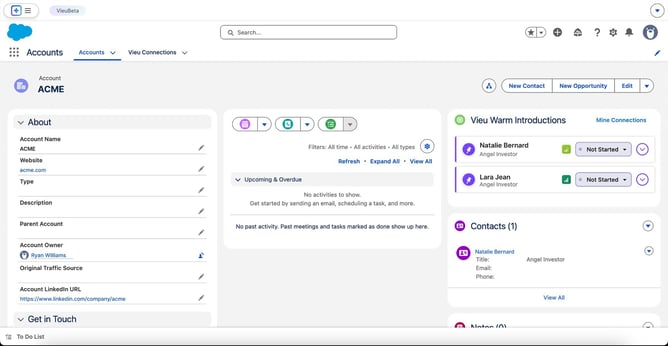
Here's how:
What Vieu pulls from your CRM |
What Vieu sends back to your CRM |
|
When you connect Salesforce or HubSpot, Vieu reads:
This context allows Vieu to:
Vieu doesn't change any of this information. It only looks at it to make matches. |
Vieu writes data back in two ways:
Vieu can also add a new contact or account when one doesn't already exist yet. |
What access level this requires
To make this work, Vieu needs to see and update your Accounts, Contacts, and Leads. It only needs to view your Opportunities and Users, not change them, so it can show relationship strength alongside open deals and figure out who owns what. Vieu also keeps its own connection data in a separate place inside your CRM, so it never mixes with your existing records.
Salesforce and HubSpot support
Vieu follows the same safety-first sync principles for both Salesforce and HubSpot:
- Permission-based access
- User-driven exports
- Clear ownership rules
While setup steps differ slightly, the underlying model stays consistent across CRMs.
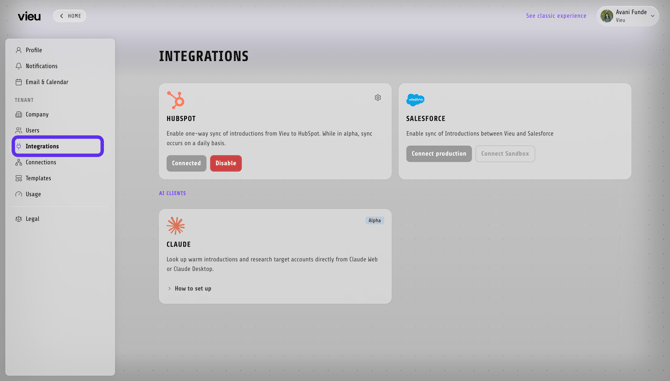
Why this setup works well
Syncing your CRM with Vieu gives teams:
- Relationship intelligence tied to real accounts
- Warm introductions that show up where work already happens
- Powerful insights without added admin overhead
You get the benefits of deep relationship data, without disrupting existing CRM workflows.
To get started:
• Learn how to connect Salesforce in Connecting Salesforce to Vieu
• See how AEs use Salesforce with Vieu day to day in Using Salesforce with Vieu as an AE.
Need help?
If you have questions about CRM syncing or want help deciding what to connect, reach out to us at valet@vieu.com. They will quickly sort it out for you.