
Overview
The New Vieu Experience helps you find the fastest path into your target accounts without switching between multiple views, tabs, or tools.
Use the new Vieu experience when you want to:
- find who can introduce you to an account or executive
- identify which accounts you can realistically break into
- prioritize accounts with strong warm paths
- explore connections across target account lists or people groups
- move from connections to action quickly
Before getting started, make sure you are using the new Vieu experience.
Understanding the homepage
The homepage is your starting point for finding relationship paths, researching accounts, and planning outreach in Vieu. You find Connector Agent and Planner Agent as soon as you open the Homepage.
1. Connector Agent
By default, you’ll land in the Connector Agent view. Use this when you want to find relationship paths to people, accounts, account lists, or groups of people.Here, you can simply describe what you're looking for. Connector Agent interprets your request, applies the relevant filters automatically, and takes you directly to the Connections View.
At the center of the page, you’ll see the search bar:
Find connections to @
From here, you can search across:
- Accounts
- People
- Account Lists (Cohorts)
- People Groups
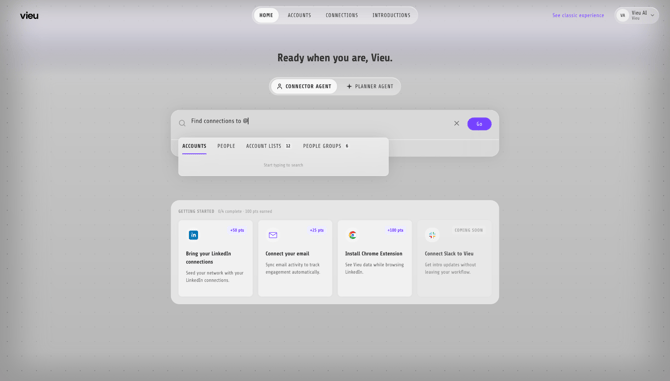
You can search across:
- Accounts → Find paths into a company
- People → Find paths to a specific person
- Target Account Lists → Explore connections across multiple accounts
- People Groups → Explore connections across multiple people
.jpg?width=670&height=457&name=01%2023%20(1).jpg)
Your search results will redirected you to Connections Vieu. This is where you explore relationship paths, stakeholder coverage, and introduction opportunities in more detail. It helps you understand:
- who can introduce you
- how strong the relationship is
- which buyers or stakeholders are reachable
- which paths are best suited for outreach
Refer to The Query Guide, to learn more about search experience and example queries,
What You’ll Find in Connections Vieu
Once redirected, you’ll see a list of stakeholders along with relationship and path information associated with your search.
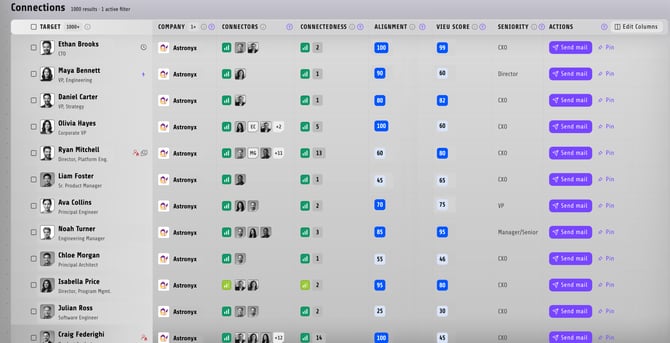
For a detailed guide on finding connections, filters, and relationship paths, see Finding & Exploring Connections in Vieu. If you're looking for a quick overview, watch the quick walkthrough video.
2. Planner Agent
Use Planner Agent when you want to research an account, understand key stakeholders, or prepare for outreach. It helps you move beyond finding connections and into planning engagement with an account or person.
Depending on your query, Planner Agent can take you directly to:
- Account Plans
- Stakeholder Profiles
- Account research workflows
Switch to Planner Agent and try queries such as:
- Find key stakeholders at @Microsoft
- Create an account plan for @Microsoft
- Show me information about @John Smith
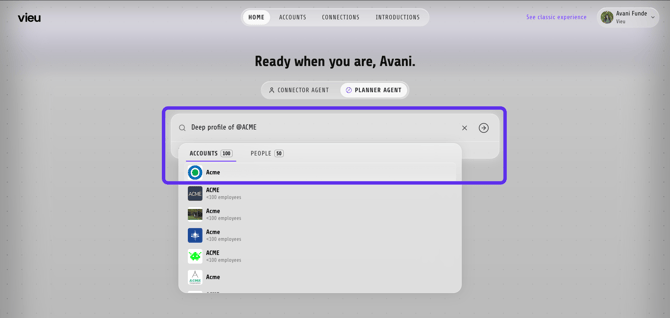
Planner Agent will analyze your request and takes you directly to the relevant account plan or stakeholder profile, helping you move from research to action faster.

Best practices
- Start with Connector Agent when your goal is to find relationship paths, warm introductions, or reachable stakeholders.
- Begin with simple queries before moving to more complex searches.
Examples:
-
Account → “Show VP and CXO connections at @Account Name”
-
Person → “Who can introduce me to @Person Name?”
-
Account List → “Which accounts in @Account List have paths through @People Group?”
-
People Group → “Who can help me reach out to @People Group?"
The more specific the search, the easier it becomes to identify actionable paths quickly.
Need help?
For custom workflows, onboarding support, or help setting up cohorts and people groups, reach out to your CSM or contact valet@vieu.com