
What is MCP?
MCP stands for Model Context Protocol.
It is an open standard that allows AI assistants to securely connect with external systems and use tools on a user's behalf.
You may already be using MCP when connecting applications such as Gmail, calendars, CRM platforms, or knowledge bases to your AI assistant.
Vieu MCP uses the same protocol to make relationship intelligence available directly inside your conversations.
You ask a question in plain English, and your AI assistant automatically retrieves the relevant information from Vieu.
What is Vieu MCP?
Vieu MCP (Beta) connects Vieu directly to AI assistants such as Claude, ChatGPT, and Gemini.
Once connected, users can ask questions in natural language and receive relationship intelligence directly inside their AI assistant.
For example:
- Who can get me into @Acme?
- Are there any paths to @Diana Black at @Neosoft?
- Explain the strongest path into @Stripe.
- Create an account plan for @ACME.
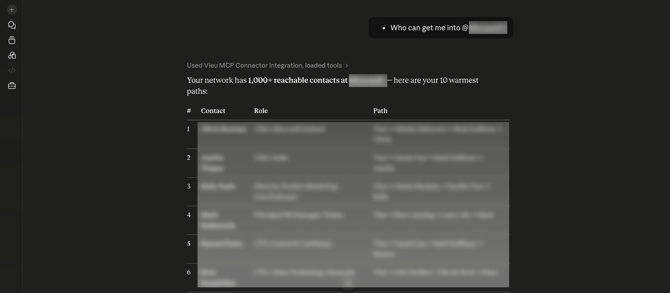
Please Note: Vieu MCP is currently in Beta and continues to improve with every release.
Today, Vieu MCP can help you:
- Find warm paths into target accounts.
- Discover introductions to specific people.
- Understand how relationship paths are connected.
- Research accounts and stakeholders directly from your AI assistant.
- Ask questions in natural language without learning special commands or syntax.
If a query doesn't return exactly what you expect, try adding more context such as the company name, title, or function.
We're actively improving search quality, relationship ranking, path explanations, and support for more complex searches based on user feedback.
Why Teams Should Use Vieu MCP?
Teams already spend much of their day inside AI assistants. Vieu MCP brings relationship intelligence into those existing workflows, making it easier to discover warm introductions, understand relationship paths, and research accounts without switching between multiple tools.
The result is a faster path from identifying an opportunity to taking action on it.
No additional application, login, or workflow is required.
What Can You Do with Vieu MCP?
Vieu MCP helps teams discover warm introductions, understand relationship paths, and research accounts without leaving their workflow.
| Capability | Example Question | Result |
|---|---|---|
| Find warm connections | Who can get me into @Stripe? | Ranked introduction paths with relationship strength |
| Explain a path | Tell me more about the path to @Dana Whitfield | Detailed relationship story and introduction context |
| Understand a person (coming soon) | Who is @Dana Whitfield and how does she relate to us? | Background, role, relationship context |
| Understand a company (coming soon) | What does @Stripe do? | Company overview and account intelligence |
Setup
-
Connect Vieu MCP to Claude → Set it up
-
Need a Video Walkthrough → See it in action
-
Looking for prompts to try? Vieu MCP Example Queries
Try out Vieu MCP
Once you've completed the setup, try the example queries below to explore Vieu MCP in action.
These examples show how Vieu helps you find warm introductions, understand relationship paths, and research accounts directly from your AI assistant.
Find Connections
- Who can get me into @Stripe?
- Do we have a path into @Acme?
- Show VP and CXO connections at @Microsoft.
Explain Paths
- Explain the strongest path into @Stripe.
- Tell me more about the path to @Dana Whitfield.
Account Research
- Create an account plan for @Microsoft.
- What does @Stripe do?
Stakeholder Research
- Who is @John Smith?
- How does @John Smith relate to us?
Frequently Asked Questions
1. Does Vieu MCP replace the Vieu application?
No. Vieu remains the source of relationship intelligence. Vieu MCP makes that intelligence available directly inside supported AI assistants.
2. Which AI assistants are supported?
Vieu MCP currently supports platforms that allow MCP connections, including Claude, ChatGPT, and Gemini.
3. Do I need to learn special commands?
No. Ask questions in natural language. Your AI assistant automatically determines when to use Vieu MCP and returns the relevant information.
4. Do I need a separate Vieu login?
You will need to authenticate your Vieu account during setup. Once connected, you can access Vieu intelligence directly from your AI assistant.