
From here, you can
- Invite teammates to contribute their LinkedIn network
- Upload your own LinkedIn connections
- Upload connections on behalf of another teammate
- Track upload status and connection counts
Access Network Boosters
Network Boosters is typically introduced during onboarding, but administrators can return at any time to invite more teammates and grow the organization's relationship graph.
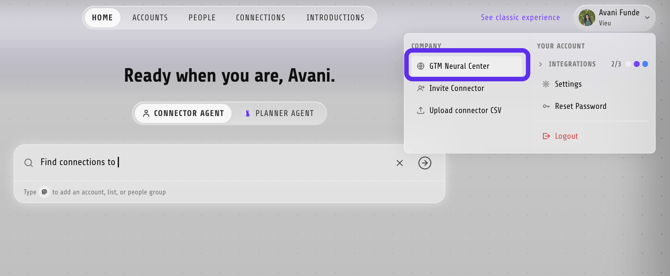
1. Click your profile icon in the top-right corner of Vieu.
2. Select GTM Neural Center.
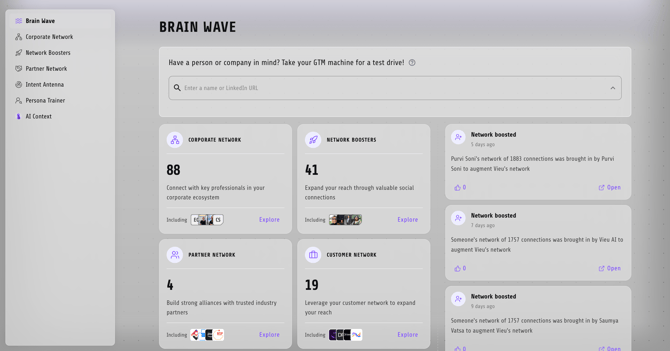
3. From the left sidebar, click Network Boosters.
Understand the Network Boosters page
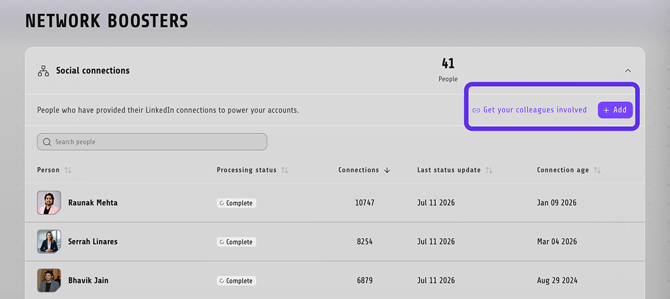
The Social Connections page shows everyone who has shared their LinkedIn network with your organization.
For each contributor, you can see:
- Person – The teammate who shared their network.
- Processing Status – Whether their upload is still being processed or is complete.
- Connections – The number of LinkedIn connections contributed.
- Last Status Update – When the upload was last updated.
- Connection Age – When the network was originally connected.
Use the search bar to quickly find a specific contributor.
Upload your LinkedIn connections
To contribute your own network:
1. Click + Add
2. Select Upload for yourself
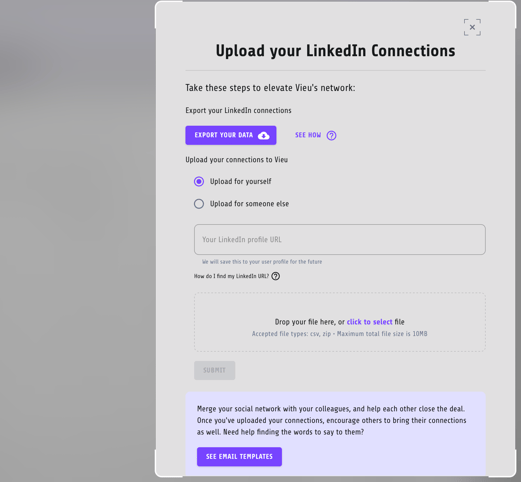
3. Enter your LinkedIn profile URL.
4. Upload your exported LinkedIn Connections file (.csv or .zip).
5. Click Submit.
Here's complete step-by-step guide to upload your LinkedIn connection : https://help.vieu.com/how-to-upload-your-linkedin-csv-into-vieu
Once processing is complete, your connections become part of your organization's shared relationship graph.
If you need help exporting your LinkedIn data, go to download my data.
Use Get your colleagues involved to access resources that help teammates understand why sharing their network benefits the entire organization. The value of Network Boosters grows with every person who contribute.
Best practice
Invite new team members to contribute their LinkedIn connections during onboarding and encourage existing employees to refresh their uploads periodically. The more networks your organization combines, the more warm introduction paths Vieu can discover for every seller.
Need help?
If you run into issues during setup or want help with field mapping, reach out to us at valet@vieu.com.