
Once you’ve identified a strong connection using an account, a person, within co-hort or a group, the next step is asking for the introduction in a way that is easy for the connector to act on.
Vieu is built for this exact moment. You can request an introduction directly from the same screen where you see the connection path.
With Vieu, you can:
- Request introductions without leaving the Connections Vieu
- Use your saved templates directly inside the intro workflow
- Review a complete, context-aware draft instead of starting from a blank email
No switching screens. No copy-pasting. No rewriting.
How introduction templates are applied
Once your introduction templates are set up, using them is instant.
When you request an introduction in Vieu:
- You can choose from templates like Short, Warm, or Executive
- Names, roles, and context are filled in automatically
- You can make quick edits if needed before sending
This keeps intro requests consistent, fast, and easy for connectors to forward.
How to request an introduction via email in Vieu
Follow the steps below to request a warm introduction using email.
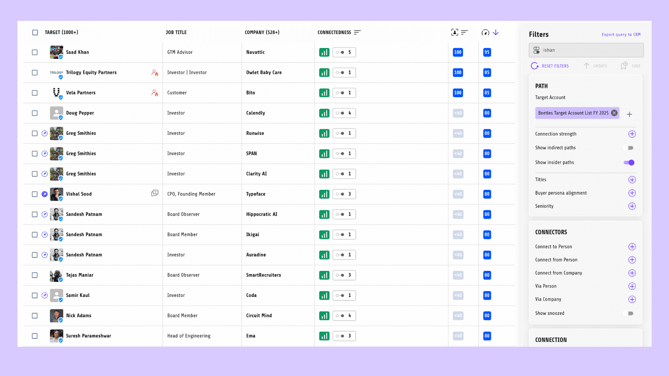
Step 1: Open the Connections dashboard
Go to Connections and use filters or cohorts to find the person or account you want to reach.
This is where you:
- Identify the target you want to connect with
- See who in your network can introduce you
Step 2: Review the connection paths
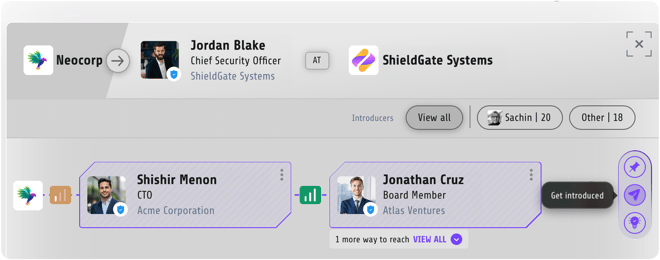
Click on a result to open the connection path view.
Here, you can see:
- Who can introduce you
- Whether the path is direct or indirect
- Relationship strength and context
Use this information to decide which connector is best positioned to help.
Step 3: Click “Get Introduced”
- Once you’ve chosen the strongest and most relevant path, click Get introduced.
- This opens the introduction workflow immediately, without taking you to a different tool or screen.
Step 4: Review and send the introduction request
When you click Get introduced, Vieu opens the intro composer with a complete introduction request already drafted for you.
Make sure your email integration is set up before requesting an intro using email.
The draft is created in one of two ways:
- If you have configured an intro template, Vieu automatically uses that template
- If you have not configured a template, Vieu drafts the message for you
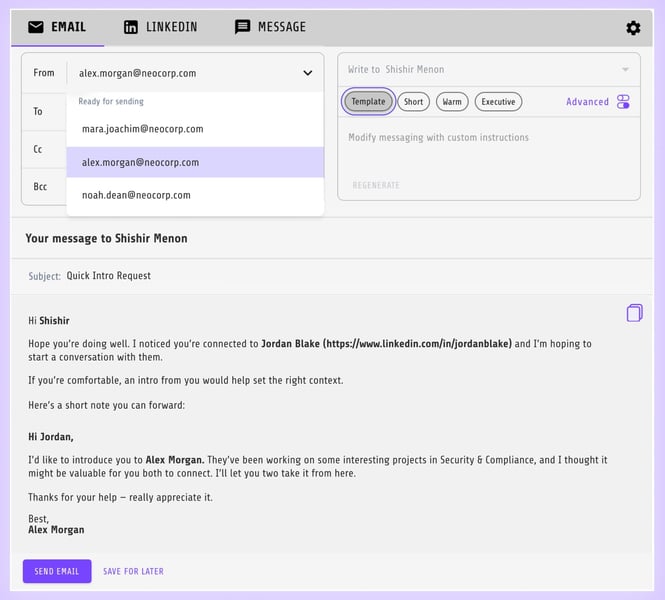
From here, you can:
- Make light edits to the message, if needed
- Confirm the connector and the target
- Click on Send Email to request the introduction, when you’re ready,
After sending, you can track the introduction automatically in Introductions Vieu
Best practice: request the intro through your strongest connection
Not all connections are equal. The success of an introduction depends on:
- The strength of the relationship
- The relevance of the connector
- How easy the request is to forward
Use Vieu’s relationship context to pick the strongest path, then send the request while the context is still fresh.
Need help?
If you’re unsure which connection to use, which template fits best, or how to frame the intro request, reach out to valet@vieu.com. We’re happy to help.